
Admin setup help

Admin Setup, Users and Integrations

A focused guide for tenant operators managing users, photographer roles, settings, integrations, billing and platform readiness.

Use this guide when configuring tenant-level users, staff access, public site settings, integrations, billing and provider setup.

5
Sections
3
FAQs
2
Fixes
Admin dashboard
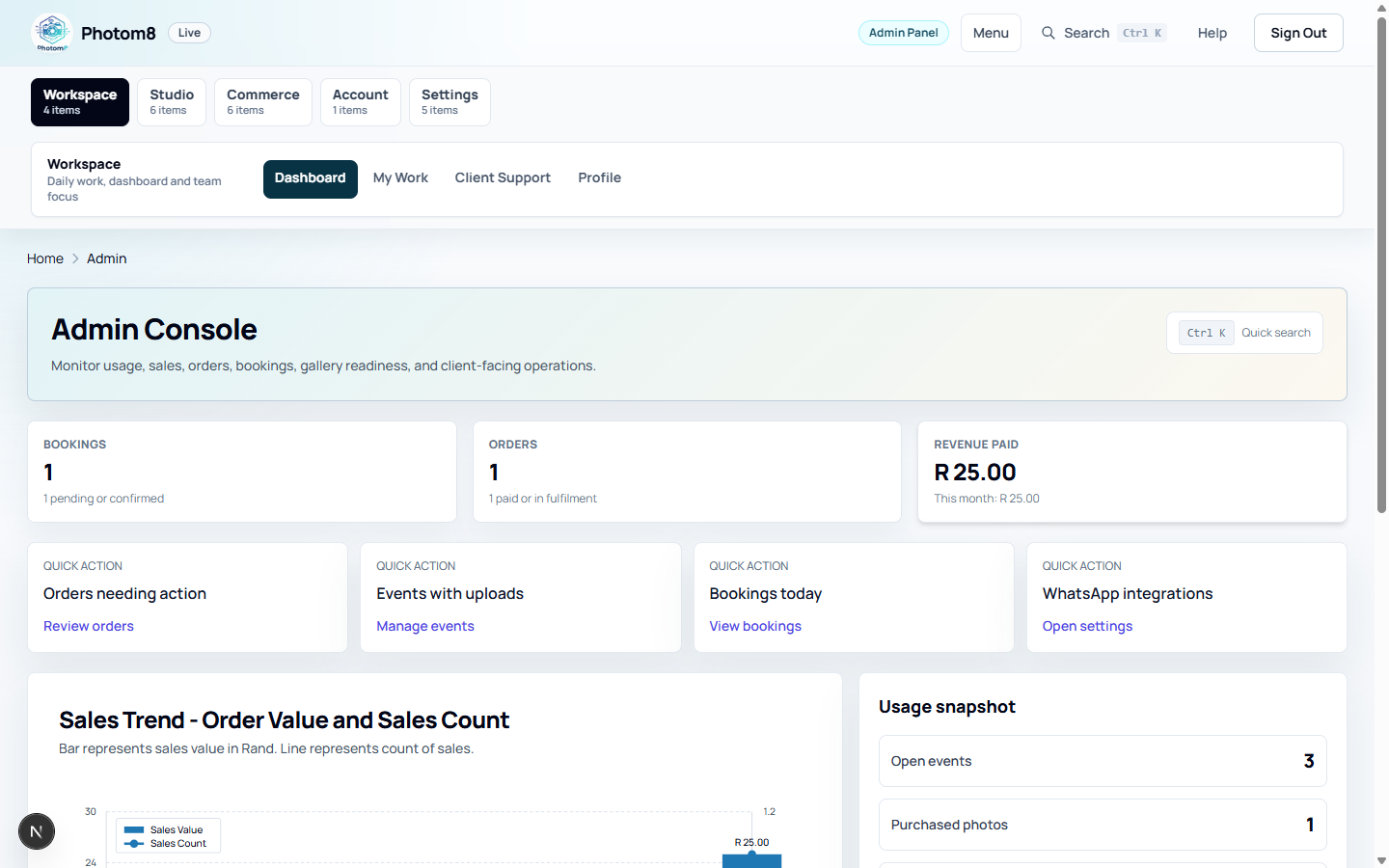
Admin dashboard: check operational health before opening work queues.
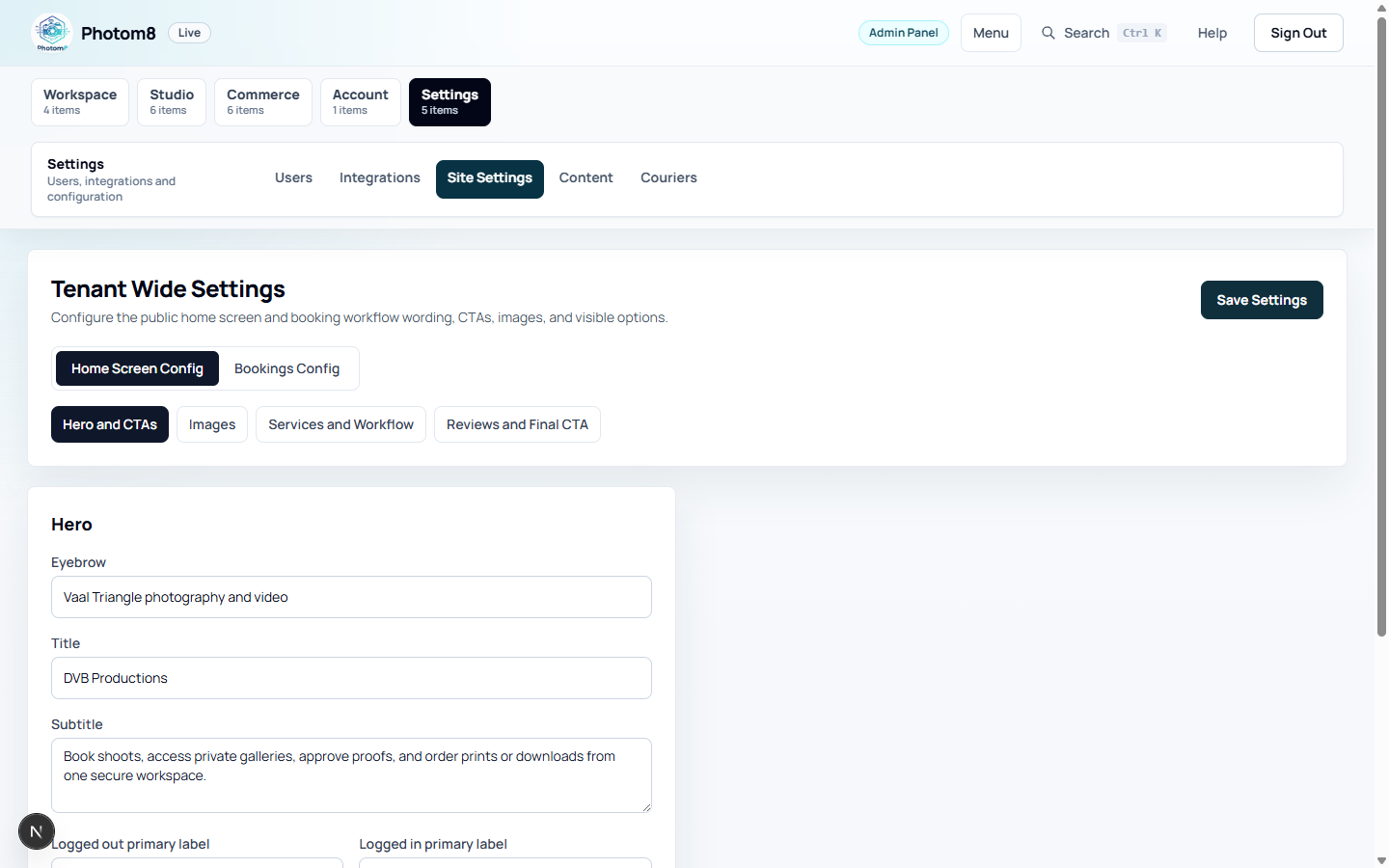
Tenant settings
Site settings: manage public content, booking copy, business setup and distance rules.

Start from the Admin Console

The dashboard summarizes bookings, orders, revenue, quick actions and usage.

/admin
Admin dashboard
Open the dashboard first to understand tenant activity.

Check the operational snapshot

Sign in as an admin and open /admin before changing work queues.

  • Bookings shows total tenant booking volume.
  • Orders shows order count across the tenant.
  • Revenue paid shows paid sales value and current month activity.
  • Quick actions open Orders, Events, Bookings and Integrations.

Invite and Manage Users

Admins control customer, photographer and admin access.

/admin/users

Choose the right role

Open /admin/users, invite the user and assign the role that matches the access they need.

  • Use CUSTOMER for clients and parents.
  • Use PHOTOGRAPHER for staff who upload, proof, fulfil and update work queues.
  • Use ADMIN only for people who manage tenant setup, billing, pricing, users and integrations.

Reset access safely

Use Send reset link for normal password recovery. Direct password setting is reserved for the platform superadmin.

  • Deactivate users who should no longer access the tenant.
  • Check duplicate email or phone values before adding a new user.
  • When a user cannot sign in, confirm tenant slug, identifier and active status first.

Set Up Photographer Staff

Photographer users run operational work without full tenant administration.

/admin/my-work

Keep staff work scoped

Assign PHOTOGRAPHER when a team member needs events, bookings, proofing, print lab, shipment or fulfilment access.

  • Photographers should not manage billing, tenant settings or users unless they are also admins.
  • Use /admin/my-work and /photographer/tasks for daily work.
  • Use Studio and Commerce menu groups for event and fulfilment queues.

Configure Tenant Settings

Tenant settings drive public copy, booking setup, business location and policies.

/admin/settings/site
Tenant settings
Site Settings controls public content, booking copy, business setup and distance rules.

Update public and booking content

Use /admin/settings/site for home screen copy, booking wording, fallback booking types, field labels, consent text, VAT and distance rules. Manage actual bookable items as Booking Packages.

  • Keep service card titles aligned with actual booking packages.
  • Use real images that clients can recognize.
  • Save changes before checking public pages.

Manage Integrations and Billing

Provider setup and billing controls determine how tenant communication, payment and usage features work.

/admin/integrations

Configure providers carefully

Use /admin/integrations for PayFast, SMTP and WhatsApp provider setup. Use /admin/billing for package, usage and add-on management.

  • Tenant SMTP controls outgoing tenant email when not using the system provider.
  • PayFast settings must match sandbox or production mode.
  • Billing confirmations may appear before actions that exceed included usage.

Troubleshooting

Use these checks when the workflow does not behave as expected.

A staff member cannot see an operational queue.

Likely cause
The role, tenant or active status may be wrong.
What to do
Check /admin/users and confirm the account has ADMIN or PHOTOGRAPHER as appropriate.

Public copy or booking wording did not change.

Likely cause
Settings may not have been saved or the wrong tenant may be open.
What to do
Save settings, refresh the public tenant page and confirm the tenant slug.

FAQ

Who should get admin access?

Use ADMIN for people responsible for tenant settings, billing, pricing, users and integrations.

When should I use the photographer role?

Use PHOTOGRAPHER for staff who need operational access to events, bookings, proofing, print lab, shipments and fulfilment work.

Where are PayFast, SMTP and WhatsApp configured?

Admins configure these providers from /admin/integrations and manage plan or usage controls from /admin/billing.